
VFFS Film Tracking Troubleshooting: Film Drift, Missed Eye Marks and Inconsistent Bag Length
- Troubleshooting a machine that is running now? Start with the quick check below, then read the section for your symptom. The handover checklist near the end lists what to pass on if the fault stays.
- Choosing your next VFFS machine? Go to the film-handling items for your next specification, then the details to send us.
If you describe a film problem to me, my first question is what the rejected bags look like. Is the back seam off-centre? Is the cut landing in the artwork? Or are the bags simply different lengths? Each answer points to a different part of the film path, and to a different fix.
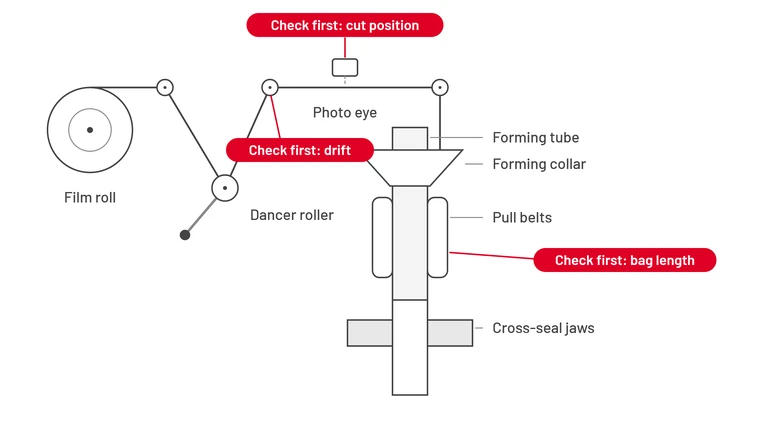
A vertical form fill seal (VFFS) machine unwinds film from a roll and folds it over a forming collar into a tube. It then pulls the film down, fills the tube, and seals and cuts each bag. The quick check below links each symptom to the area worth checking first.
| What you see | Likely area | Check first | Setting, part or film? | Read more |
|---|---|---|---|---|
| The back seam drifts off-centre, or the film runs to one side of the collar | Film roll, unwind shaft and the path up to the collar | Roll centred and locked; film threaded on the right path; roll edges even | Loading or threading first; the film if the fault follows one roll | Film drift |
| Wrinkles, squealing or drag at the collar or tube | Forming collar, forming tube and pull belts | The forming parts match this film width; forming parts and rollers are clean | Cleaning or a part; the film if it began with a new lot | Collar wrinkles |
| The cut lands in the artwork, or creeps along it | Registration set-up, the photo eye and the printed mark | Whether the cut is offset by the same amount or moves; then mark detection and the mark lane | A setting if the offset is steady; sensor set-up or artwork if marks are missed | Eye mark |
| Every bag is the same wrong length | Bag-length setting or recipe | The value on the touch screen and the recipe that is loaded | Usually a setting | Bag length |
| Length changes from bag to bag | Pull belts, film tension and position feedback | Belt grip and cleanliness, dancer movement, encoder | Machine condition; the film if it began with a new roll | Bag length |
| The fault appears with one roll or one lot only | The film | Run a known good roll from another lot and compare | Usually the film | Film or machine |
Keep a few rejected bags from each fault, and note the time each one came off the machine.
Which Problem Do You Have: Film Drifting Sideways, a Cut in the Wrong Place, or Bag Length That Changes?
Before you change a setting, sort the fault into one of three groups. Each group has its own causes and fixes, and adjusting the wrong thing can hide the real problem.
- Sideways drift runs across the web. The back seam moves off-centre, one film edge overlaps more than the other, or the film creeps to one side of the collar.
- Registration faults only happen on printed film. The bag can be the right length while the cut sits in the wrong place on the artwork.
- Length faults run along the web. Bags come out too long, too short or uneven, on plain or printed film.
I’d ask two questions to narrow it down. First, is the film printed with an eye mark, or plain? On printed film, the eye mark and photo eye also come into play. On plain film there is nothing to read. Rockwell Automation’s VFFS application guide puts it this way: without printing, “the process is defined solely on length.”
Second, is the error the same on every bag, or does it change? Bag length is the distance the film is pulled each cycle, set on the touch screen. A wrong value repeats on every bag, so a steady error usually points to the setting or the recipe. On plain film, a length that changes from bag to bag means the film is not travelling the distance the machine expects. That points to grip, tension or position feedback. On printed film, the photo eye also corrects each pull, so check whether the cut moves too.
How to tell a steady error from a changing one
Before you order spare parts, I recommend measuring a run of consecutive bags and noting when the change starts. A step change after a roll change suggests the film. A slow drift as the roll empties suggests unwind tension. Random scatter suggests grip or feedback.
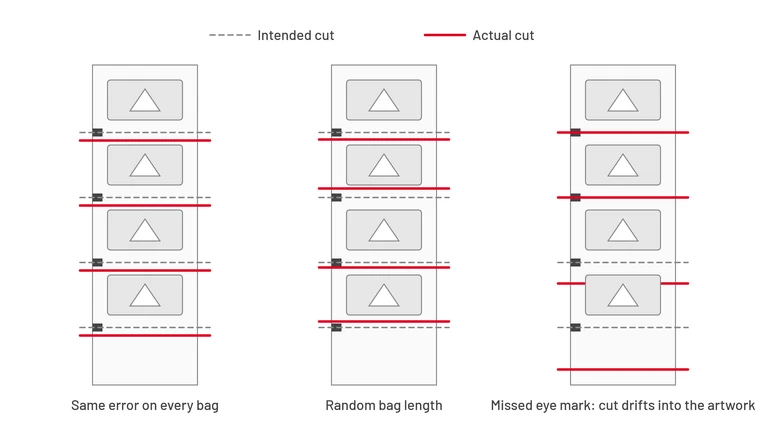
On printed film, some machines let you switch registration off and run on length only. If yours does, a short run that way splits the two causes. If the length is still unstable, look at the pull system. If it settles, look at registration. Expect the print to wander during that test, so use it only to diagnose. Whatever you test, change one thing at a time, at the speed where the fault appears.
Which group you are in also helps decide who you call. A wrong setting usually starts with the operator. In most cases, worn or wrong parts go to maintenance or your machine supplier. If the fault follows one roll or lot, bring in the film supplier or printer.
When to stop and call someone
Several checks below put your hands near the collar, tube, pull belts or photo eye. Do them only with the machine stopped and locked out, following the machine’s own lockout procedure.
Stop adjusting settings if a forming part is bent or a pull belt is torn. The same applies if a sensor or encoder bracket has been knocked out of place. Call maintenance: damaged parts need repair before any setting will hold.
Two cases sit outside this guide. It covers vertical form fill seal machines only, because horizontal flow wrappers and premade pouch machines handle packaging differently. Seal faults are covered in our guide to VFFS and Flow Wrapper Seal Problems: Causes and Fixes.
Is It the Film or the Machine?
The machine checks in the sections that follow assume the film itself is fine. A simple rule tells you when it is not. If the fault appears with one roll or one lot and disappears with another, suspect the film first. If it stays the same across several rolls, look at the machine. If it grows as each roll runs down, look at the unwind tension.
Film can change between lots in ways you cannot see. Print colour can vary. Slip can change too: films with migrating slip additives can show wide COF variation, which “will change with time”. Roll faults such as camber or telescoping, covered under film drift, also travel with the roll.
You will see COF (coefficient of friction) on film data sheets. ASTM D1894 measures the starting and sliding friction of plastic film under specified test conditions. On its own, it does not tell you how a film will run on your machine. The standard also warns that comparing slip on films produced at different times can be meaningless. Published VFFS film data agrees that the lab COF test alone “is frequently not a good predictor of performance”. So a COF result within specification does not rule the film out. A comparison run with a known-good roll helps you judge whether the fault follows the film.
A known-good roll, or reference roll, makes that trial quicker, and I recommend keeping one. Set aside a roll from a lot that ran well, and run it when a new lot causes trouble. If the old roll runs cleanly, send the bad bags and both roll labels to your film supplier.
| What you see | Likely cause | Who to ask first |
|---|---|---|
| The fault starts with a new roll or lot, and a reference roll runs cleanly | The film: print, slip or winding | Film supplier or printer |
| The fault looks the same on every roll | Machine settings or wear parts | Operator, then maintenance |
| The fault grows as the roll gets smaller | Unwind brake or dancer tension | Machine supplier |
| The fault started right after a changeover | Wrong forming parts, recipe or sensor position | Operator |
Why Does the Film Drift to One Side Before the Forming Collar?
If your film walks to one side of the collar, you usually see it on the back seam (the vertical seal). The cause often sits further back. The film has to arrive at the collar centred and under even tension. If it arrives off-centre, the collar folds it off-centre and the back-seam overlap becomes uneven.
Many of the causes below act by making tension uneven across the film width. Loading and threading come first because they are the cheapest to rule out. Many VFFS machines have film alignment or tracking adjustment, meant “to make sure that the film stays in the correct place on the forming tube.” Rule out the causes below before you change it.
Check the roll and how it is loaded
I’d start with the roll on the unwind shaft. If it sits off the machine’s centre line, or can shift along a loose shaft, the web starts from the wrong position. Centre it and lock it before you touch anything else.
Then follow the threading path. A roller missed or added changes the angle at which the film reaches the collar. Rollers, including the dancer roller, also must be aligned to avoid cross-web tension variation, which can cause wrinkles and poor registration. Walk the film from the unwind towards the collar, and find the first point where it is no longer flat and centred. Start there.
Check the roll itself
If drift starts when a new roll goes on, look at the roll before the machine. Baggy or uneven edges and a telescoped roll, where the layers have shifted towards one end, can feed unevenly. Camber in flat film makes it “difficult to print and machine”, and a telescoped roll can be impossible to convert. Keep the roll label and a sample of the bad section.
Check how the film is pulled and tensioned
Uneven pull can also steer the film. Many VFFS machines pull film with two belts, typically one on each side of the tube. Control code often monitors both sides, so that one belt does not pull more than the other. If one belt grips harder, the film may be pulled towards that side.
Tension also comes from the unwind. Many unwind shafts are unpowered and use a pneumatic or friction brake to set tension, often with a dancer roller. If drift gets worse as the roll runs down, note the roll diameter when it starts. Then watch the dancer. In a dancer system, the goal is “for the dancer to remain at the mid-point of travel.” A dancer resting at one end of its travel can point to the brake or dancer setting.
Check automatic film tracking, if your machine has it
Watch how the film moves. A steady creep to one side points back to the roll, the threading or the tension. If the film hunts back and forth instead, look at the tracking system itself. A web-guide manual for general web-processing lines lists three causes when the guide is “unstable in Automatic mode”. They are system gain set too high, loose cable connectors, or incorrect sensor calibration.
Compare machines: what holds the film steady on ours
On our SW-1528 sachet machine, a double film clamp plate steadies the film between the roll and the forming shoulder. Spring-loaded dancer arms set the tension. Our SW-420E collar-type powder machines use dancer rollers and a servo film pull.
For the SW-420E series, an automatic correction motor is available as an option. It compensates vertical seal offset from the HMI without stopping the machine. It does not replace loading and threading the roll correctly.
Why Does Film Wrinkle, Drag or Jam at the Forming Collar?
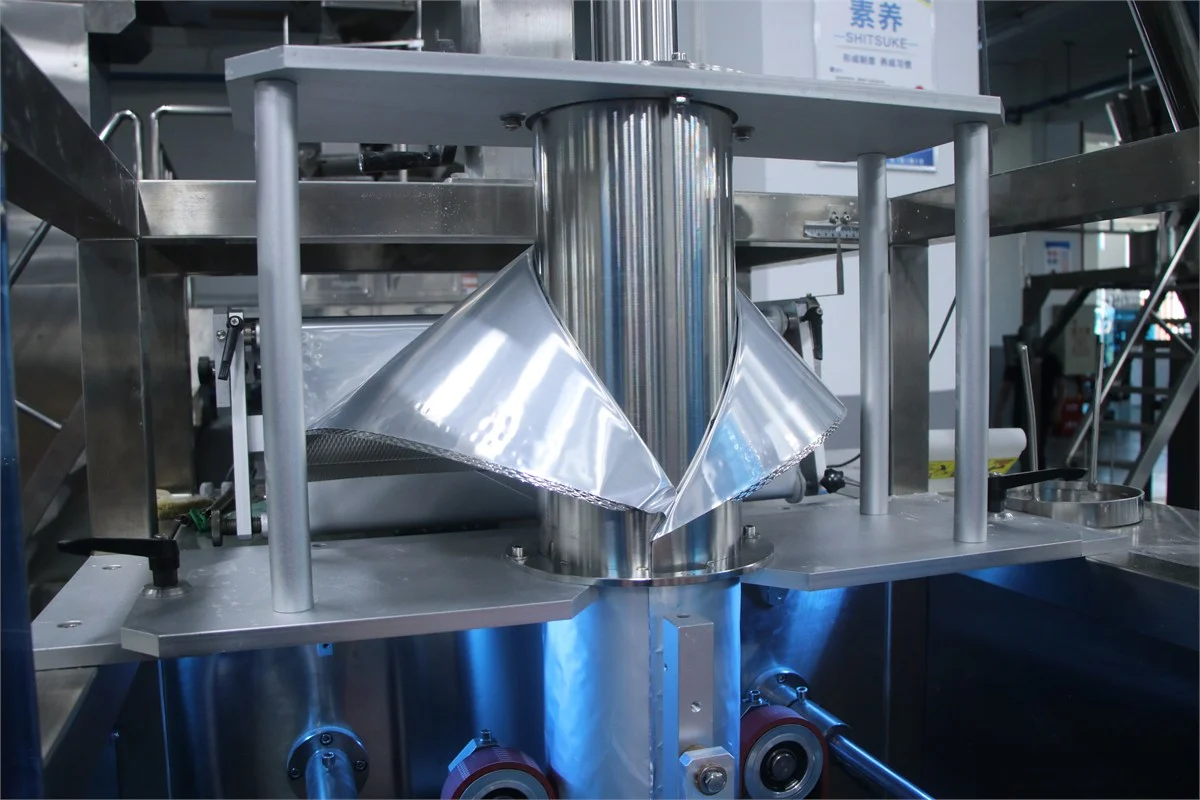
Once the film reaches the collar, the forming parts take over. The forming collar and tube are hardware. They are made for one bag width and matched to a film width, so you cannot adjust them on the screen. Our Hungary milk powder case study puts it plainly: a different width “needs a different collar and the film threaded again”.
The photo below is from inside our SW-420E. Look at three parts: the forming collar, the forming tube and the pull belts below them.
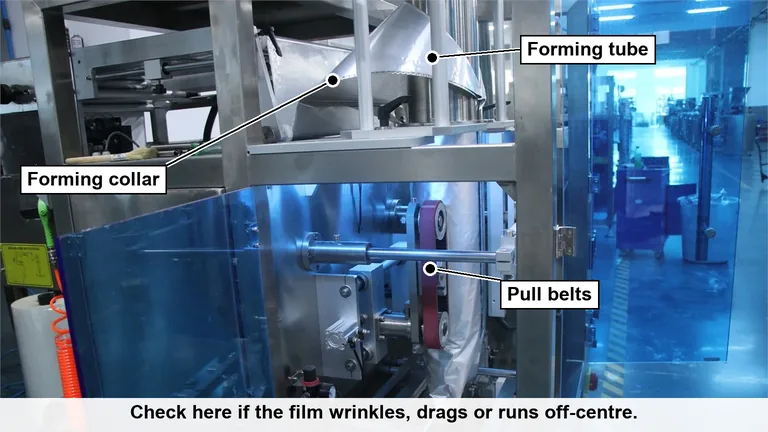
That width match matters. To leave material for the back seal, “the width of the film must be greater than the circumference of the forming tube.” If the wrong collar is fitted after a changeover, the overlap is wrong before the machine even starts.
Look at friction between the film and the collar
The film’s outside surface slides over the metal collar, and its inside surface slides down the tube. At the VFFS collar, published film data drawn from ExxonMobil calls for low outside film-to-metal friction. It links this to preventing “film squealing, inconsistent film feeding and inconsistent bag lengths”.
On belt drives, the outside surface must also grip the belts, while the inside must slide over the tube to prevent jams. So if squealing or drag starts with a new film lot and the parts are clean, compare that lot with a roll that ran well.
Clean the collar, tube and rollers
Residue on the forming parts adds drag. Fatty amide slip additives “can deposit and accumulate on rollers and packaging machine surfaces”, and residue on rollers raises friction and tension. My advice is to clean the collar, tube and film-path rollers, with the machine locked out, before you order parts. It is the cheapest check on this list.
Check tension at the collar
Film tension at the collar comes from the pull belts. The belts provide “the actual force to pull the film through the machine”. They also hold tension on the forming plow and tube. If wrinkles come with uneven bag length, check the pull system too, as the bag-length section explains.
A different bag width requires the matching forming parts. On our SW-1528, both the former and the sealing mould are made for the bag width, so budget for both when you plan new sizes.
Why Does the Cut Land in the Artwork, and Is It the Photo Eye?
This section is for printed film. If your film is plain, skip to bag length.
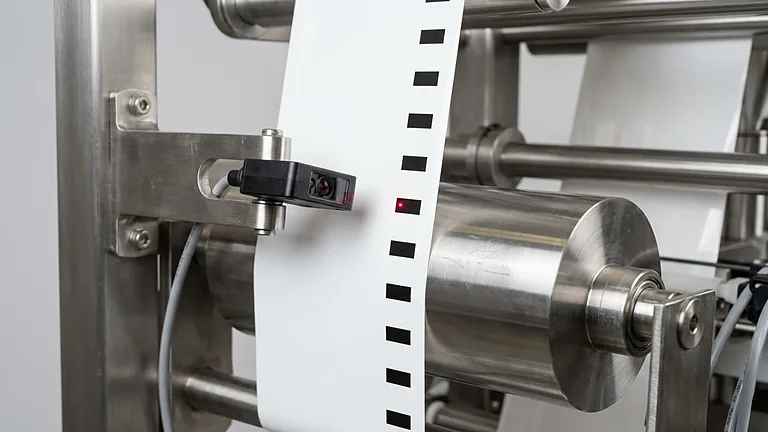
An eye mark, also called a print mark or registration mark, is a small printed mark on the film. A photo eye reads it, and the controller corrects the pull length so the cut lands between print repeats. On our SW-1528 four-side seal sachet machine, the photocell eye reads the registration mark and “adjusts the pull length in real time”. Film pull with photoelectric mark registration is shared across our vertical packing machines.
Registration is “a method to make minor adjustments” to where the seal and cut land. So the bag-length setting still needs to be close to the print repeat.
If the intended mark is detected consistently but every cut is displaced by the same amount, check the mark-to-cut offset and recipe first. If detections are missing or extra, check the sensor set-up and the mark lane. A missed mark is one possible cause of an isolated length error. Check the sensor output against the passing marks.
Check that the mark stands out from the print around it
Many registration sensors work on contrast. A contrast sensor “converts every color it sees to a grayscale value” and switches at a threshold. If other print in the same lane looks similar in grey, the sensor can trigger on it. The result can be “false trips and improperly cut labels” (the source page is about labels; the principle is the same on film).
Look along the lane the sensor reads, in the direction the film travels. Pick a mark colour that appears nowhere else in that lane, or move the mark to a clear lane. A quick test is to photocopy the artwork in black and white, which shows roughly what a contrast sensor sees.
Check the sensor angle and the film surface
Glossy and metallised films reflect a lot of light. On conventional colour mark sensors, the angle “needs to be finely adjusted to avoid saturation”, and tilting too far makes detection unstable. Some models are designed to mount directly over reflective film. Others may need tilting: for high-gloss material, one contrast sensor manual says a tilt “might be necessary” for stable detection. The right angle depends on the sensor, so follow its manual. Thin, soft wrapping material can also be hard for a conventional sensor to detect stably, because its angle shifts.
Check how the film is supported where it passes the sensor, because flutter there can upset detection. Where you can, have the sensor read the mark as the web runs over a tension bar or roller, to limit flutter. Sideways drift can also carry the mark lane out from under the sensor, so fix drift first.
Compare print colour between lots
If the eye started missing marks with a new film lot, compare the print. Omron describes a sensor that logs RGB data to a host. After false detections, that colour data can show whether colour has varied “from lot to lot in packaging material”. Print can vary between runs, so keep a sample from a lot that ran well.
Check dust, sensor position and set-up
Also check the simple things. With the machine locked out, clean the lens and the film path in front of it of product dust. After a film width or artwork change, make sure the sensor still sits over the mark lane and has been taught the new mark.
On sensors with a static teach, you show the sensor the mark and the plain background in its light spot, one at a time. One sensor manual recommends teaching both “every time in order to achieve the most reliable detection”. Some sensors can also learn while the film runs, so follow your sensor’s own manual for the teach steps.
Then run the machine slowly and watch the sensor’s output light. It should switch once for each mark, and not on the print in between. Some sensors also show “signal strength with respect to the sensing threshold”, which tells you how much margin the mark has.
Write the eye mark into your film specification
I treat the eye mark as part of the artwork brief, not just a machine setting. CarePac, a custom pouch printer, notes that the print specification provides the eye mark’s “position, size, color, and other important information.” Fix those details in the artwork brief before it is final.
Then test what happens when a mark is missed. Our factory acceptance test guide lists it as a check: does the machine flag the fault, or keep sealing through the print?
Why Do Bag Lengths Vary from Bag to Bag?
Once registration is ruled out, or if your film is plain, bag length comes down to the pull. If every bag is the same wrong length, check the setting and the recipe first. If the length jumps around from bag to bag, measure a run of bags as the first section describes. Then work through the checks below.
Several factors let print drift from its place on the bag: “printing process variations, film stretch, film slippage during acceleration, and other factors.” Stretch and slippage affect plain film too. If the variation only appears after a speed increase, start with grip at the pull belts.
Check grip at the pull belts
The pull belts, also called feed belts or film transport belts, do the pulling. If they slip on the film, each pull can come up short by a different amount. Some machines use vacuum belts for better grip in dusty, humid or cold conditions.
With the machine locked out, compare the two belts for product build-up, dust and wear. Check that they press evenly on the tube. A worn or contaminated belt may not grip the film consistently. If one belt looks different from the other, that is usually a job for maintenance.
If the belts look alike but grip still varies, maintenance can check the contact. One web-handling paper describes this for roller nips, and the same idea shows whether the belts press evenly. It suggests shining a light through the nip to find gaps, or using nip impression paper. It “turns color when a sufficient pressure has been applied”, so uneven pressure shows up as uneven colour.
Check film tension and stretch
The dancer roller keeps constant tension on the unwinding film. Together with the unwind motor, dancers are needed for “critical accuracy in feed”. Watch the dancer while the machine runs. It should ride near the middle of its travel, moving in small steps. If it sticks or sits at one end, tension can swing and bag length can follow.
Film stretch is on the same list. When a new film is thinner or softer than the last one, note the grade and gauge of each roll for comparison.
Check position feedback
Our SW-420E collar-type auger powder machine uses an Omron rotary encoder for film position and bag-length control. If length still varies after the belts and tension check out, the encoder and its mounting come next. On machines where the encoder turns a measuring wheel on the film, the wheel must press firmly enough not to slip. Dynapar, an encoder maker, calls avoiding slippage “the most important aspect of measuring length with a measuring wheel encoder”. A slipping wheel loses part of the film’s movement, so the reading and the actual pull no longer agree. That check usually belongs to maintenance, so give them your record of consecutive bag lengths.
What Can You Fix on the Screen, and What Needs a Part or Different Film?
By now you should know which group your fault is in. Some faults are settings an operator can change. Some need a part. Some go back to the film supplier. The table sorts the faults in this article into those three groups. Exactly what the HMI lets you change varies by machine, so check your manual.
| Fault | Fix on the HMI | Needs a part | Needs a film change | Call first |
|---|---|---|---|---|
| The back seam is off-centre | Adjust seal-offset correction on machines that have it (an option on our SW-420E series) | Forming parts, if they are damaged or wrong for the film | Camber, baggy edges or a telescoped roll | Operator, then maintenance |
| Wrinkles, squealing or drag at the collar | Check relevant tension settings where provided. Settings cannot correct a wrong former or residue on the film path. | Clean the forming parts and rollers; fit the right forming parts for this film width | Outside-surface slip that changed between lots | Maintenance, then the film supplier |
| The cut drifts into the artwork | Check the mark-to-cut offset and recipe; re-teach or re-set the photo eye (on the HMI or at the sensor, depending on the machine) | A sensor or bracket, only if it is damaged or has moved | Mark colour or position, or print colour that changed between lots | Operator, then the printer |
| Every bag is the same wrong length | Set the bag length; check that the right recipe is loaded | Not usually | Only if the print repeat differs from the artwork specification | Operator |
| Length varies from bag to bag on plain film | Check the pull and tension settings where the HMI shows them. Dancer checks are done at the machine: see film tension and stretch. | Cleaned or replaced pull belts; dancer parts; the encoder, if maintenance finds a fault | If it began with a new lot, run a known-good roll and compare | Maintenance |
| A new bag length at the same width | Within the machine’s specified bag-length range, change the length setting; the former does not change. Printed film must have a matching repeat. | None | Printed film only: artwork with the new repeat length | Operator |
| A new bag width | No | The matching forming parts and rethreading: a collar and tube on collar-type machines, a former and sealing mould on the SW-1528 | A film width that suits the new forming parts | Machine supplier, before you order |
Start with the row that matches the symptom, not automatically with the HMI column. Go through the current recipe and the relevant loading, threading or sensor checks before changing settings. On our machines, the HMI stores product recipes, which makes the recipe check quick. If a setting change only holds for a few minutes, the cause probably sits in one of the other two columns.
If you are troubleshooting a running machine, this is where the checks end. If the fault is still there, the handover checklist lists what to pass on.
What Film-Handling Items Belong in Your Next VFFS Specification?
This section is for buyers. If you are choosing a new vertical form fill seal machine, put the film handling in the specification. Don’t leave it for the factory floor. These are the items I’d agree before the order.
- Your bag widths. Group every bag size by width. Each width needs its own forming set, so the list tells you how many to order. In our Mexico protein powder sachet case study, two sachet widths meant a second former was included with the machine.
- Printed or plain film. If the film is printed, specify photo-eye registration and what must be printed on each bag. In the Hungary milk powder order, the buyer asked for photo-eye registration and a date printer on both machines.
- Film width. Each forming set is matched to a film width, so list the film width for each format.
- How the film is held and tensioned. Ask what holds the film between the roll and the collar, how tension is set, and how bag length is measured. Ask whether seal-offset correction is standard or optional.
- An acceptance test on your film. Our acceptance test guide puts it simply: “Send the film you will buy, from the roll you will buy it from.” Send a sample for each format. For the SW-1528, we run a packing test on your product and film at our Shantou factory. We share a video of the result. Run long enough to see a roll run down, because faults such as “film tracking drifting as a roll runs down” show up later. Test what the machine does when it misses an eye mark.
Sometimes the same faults keep coming back after the film, settings and wear parts have all been checked. If you are weighing a replacement then, compare the cost of that downtime with a machine specified for your formats.
Frequently Asked Questions
What is an eye mark on packaging film?
An eye mark, also called a registration mark, is a small printed mark that a sensor reads as the film moves. On a VFFS machine it tells the controller where each print repeat is, so the cut lands between repeats. The mark does not have to sit on the cut line, because the machine can cut at an offset from it. Only printed film needs one.
How does an eye mark sensor work on a VFFS machine?
The sensor shines light on the film and detects the change in reflected light as the mark passes. A contrast sensor converts colours to grey values and switches at a threshold that is taught to it. Each cycle, the controller uses that signal to correct the pull length. Plain film has no mark, so length comes from the pull distance alone.
Can the film itself cause bag length variation?
Yes. Friction between the film and the forming collar, film stretch, and slip that changes between lots can all affect how evenly the film feeds. If the variation starts with a new roll or lot, run a roll from a lot that worked and compare. A COF result within specification does not rule the film out on its own.
What does the forming collar decide on a VFFS machine?
The forming collar, also called a forming shoulder, and the forming tube fold the flat film into a tube and set the bag width. They are hardware matched to a film width, so a new bag width needs a new set and rethreading. Bag length is different: it is the pull distance per cycle, set on the touch screen.
Can automatic film tracking correct every sideways drift?
Not on its own. Load and thread the roll correctly first, and treat correction as a way to hold position on top of that. On our collar-type powder machines, an automatic correction motor is an optional add-on that compensates vertical seal offset from the HMI. Ask any supplier what range of offset their system can correct.
Still Not Fixed? What to Hand to Your Machine or Film Supplier
If the fault survives these checks, pass it on with evidence rather than a description. When it is unclear whether the film or the machine is at fault, bring both suppliers in. Working with film and machine suppliers together “can often help pinpoint the problem”.
Hand Over
- A few rejected bags from each fault, marked with the time they came off the machine
- The roll label from the roll that ran badly, with a sample of the bad section
- Your reference-roll result: whether a roll from a lot that ran well ran cleanly
- Your record of consecutive bag lengths
- When the fault appears: after a roll change, a changeover or a speed increase, or as the roll runs down (with the roll diameter)
- The grade and gauge of each roll or lot you compared
- A photo of the HMI settings screen, and a note of what you changed and in what order
With that list, ask your machine supplier for the belt inspection and replacement criteria for your model. Ask your film supplier whether a new grade stretches more under tension. If it is a ShengWei machine, send the same list to us.
Planning a New VFFS Line? Send Us These Details
If you are specifying a new machine, a few details let us check the film handling before we quote.
Please Send
- Your bag sizes, width × length, for every format you plan to run
- A sample of your printed film with the eye mark, or a photo of one full print repeat
- What must be printed on each bag, such as the date, batch code or QR code
- Your product and the fill weight per bag
From there, we confirm how many forming sets your bag widths need and how the photo eye should be set up for your print. Then we recommend a ShengWei model and quote it.
Related Guides and Case Studies
- Vertical Form Fill Seal Machines
- SW-1528 Four-Side Seal Sachet Machine
- SW-420E Collar-Type Auger Powder Machine
- Hungary Milk Powder VFFS Case Study
- Mexico Protein Powder Sachet Case Study
- Factory Acceptance Test Guide
- VFFS and Flow Wrapper Seal Problems: Causes and Fixes
- More from the blog
References and Sources
- Rockwell Automation: Vertical Form Fill and Seal Application Technique: film registration, unwind tension, pull belts and forming tube; December 2012 publication
- Bostik laminating adhesives: Web Handling: roller alignment, roller residue and web tension
- LyondellBasell: How to Solve Blown Film Problems: camber, baggy film and telescoped rolls
- PFFC (Paper, Film & Foil Converter): Tension Control: Dancer Systems Defined: dancer position and unwind tension; April 2009
- Maxcess: FIFE-500 Web Guiding System User Manual: troubleshooting a web guide that is unstable in automatic mode; written for web-processing equipment in general
- Poly Print: Coefficient of Friction: film friction at the VFFS forming collar and the limits of lab COF tests, based on ExxonMobil film data
- SICK: How to Design Registration Marks that can be Read by a Contrast Sensor: mark colour and position for contrast sensors
- Omron: E3S-DC / E3NX-CA Color Mark Sensors catalogue: sensor angle on glossy packaging and detection on thin, moving material
- SICK: KTML Contrast Sensor Operating Instructions: sensor tilt on high-gloss material; 2025 edition
- Banner Engineering: R58E Expert Series Registration Mark Sensor: sensing over a roller to limit web flutter, and the signal strength display
- Omron: E3S-DC Color Mark Photoelectric Sensor: checking lot-to-lot print colour variation after false detections
- Rockwell Automation: 45CRM Color Registration Mark Sensor Installation Instructions: teaching the mark and the background
- CarePac: What Is an Eye Mark: eye mark position, size and colour in the print specification
- TAPPI: Nip Impressions (David R. Roisum): checking roller nip contact with a light and with nip impression paper; 2004 TAPPI newsletter paper
- Dynapar: How to Measure Linear Distance with Rotary Encoders: avoiding slippage on measuring wheel encoders
- ASTM D1894: static and kinetic coefficients of friction of plastic film and sheeting; 2024 edition
Public-data note: ShengWei product pages, case studies and the reference pages above were checked on 27 October 2026; the PFFC, Maxcess, Banner, 45CRM, SICK KTML, TAPPI and Dynapar pages were added on 31 October 2026. ShengWei machine details here come from our published product pages; they describe the machines as specified, not results measured at a customer’s plant. The case-study points used here are order and specification details. Supplier pages explain general principles; confirm settings for your own sensor, film and machine with those suppliers. The ASTM link leads to a public summary; the full method may require access to the standard.
Send Your Film and Bag Details
Send the details listed above, and we will reply with a machine recommendation and a quote.
Email info@shengweimachine.com · or contact our engineering team

International Sales Manager · ShengWei Machine